上一篇笔记介绍event driven input, 最后提到轮询与事件驱动. 这一篇先不讲这个. 上一篇提到btn.OnClick += ClickHandler. XNA没有提供GUI, 需要自己实现Button和其他控件. 有一个XNA Simple GUI,https://simplegui.codeplex.com/,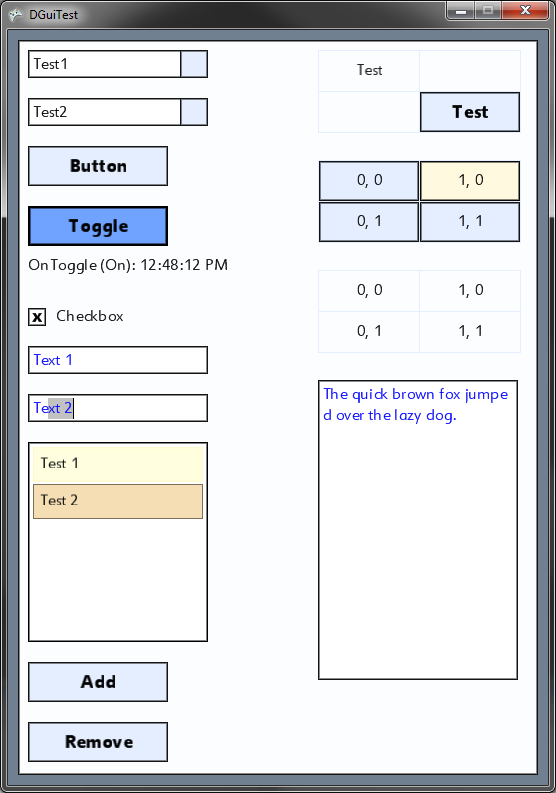
可以大致了解一下XNA中GUI的实现方式.组合模式加控件树倒没有多少问题, 主要看它是如何实现btn.OnClick += ClickHandler的.
XNA Simple GUI的使用方式如下:
1
2
3
4
5
6
7
8
9
10
11
12
13
DGuiManager guiManager = new DGuiManager(this, spriteBatch);
DForm form = new DForm(guiManager, "MainForm", null);
form.Size = new Vector2(640, 480);
form.Position = new Vector2(10, 10);
form.Initialize();
guiManager.AddControl(form);
DButton button = new DButton (guiManager, 5, 5, "Button"); // Button at 5,5 with text "Button"
button.Initialize();
form.AddPanel(button);
button.OnClick += new ButtonEventHandler(handleClick); // Register the click listener
DGuiManager 内含一棵UI控件树DGuiSceneGraph, 所有的UI控件继承DPanel, DPanel继承DGuiSceneNode
class DGuiManager : DrawableGameComponent
class DGuiSceneGraph : DrawableGameComponent
class DGuiSceneNode : DrawableGameComponent
DGuiManager 的Update调用_sceneGraph.Update(gameTime), 后者调用UpdateRecursive(gameTime, rootNode);
DGuiManager 的Draw调用_sceneGraph.Draw(gameTime), 后者调用DrawRecursive(gameTime, rootNode);
1 | void UpdateRecursive(GameTime time, DGuiSceneNode node) |
Button的祖先如下:
DrawableGameComponent
DGuiSceneNode
DPanel
DButtonBase
DButton
DButton继承自DrawableGameComponent, 下面是Button的Update, 可以看到Button的OnClick仍旧是每帧轮询的方式. 当它检测到自己被点击时, 调用事件处理方法.
1 | 以Button的Update为例, Button内没有Draw方法 |
Button在调用Update的时候, 它得判断鼠标是点的它, 而不是点另一个按钮.
下面是Button的基类DPanel的Update方法中所做的判断1
2
3
4
5
6
7
8
9
10
11
12
13
14
15
16// Is mouse hovering over?
if (ms.X > absPos.X && ms.X < (absPos.X + _size.X) &&
ms.Y > absPos.Y && ms.Y < (absPos.Y + _size.Y))
{
_isMouseHoveringOver = true;
if (_hoverEventsEnabled == false)
HoverEnter();
if (ms.LeftButton == ButtonState.Released)
_hasHoveredBeforeClick = true;
else if (_hasHoveredBeforeClick)
{
_guiManager.FocusListEnqueue(this);
}
}